Wednesday, November 4, 2015

Active Sunspot Region 2443

Had thin clouds on Sunday but I wanted to try to get a photo of active sunspot region 2443 that I've been hearing so much about. I haven't taken many sun photos with my DIY solar filter for my DSLR, but when there is an especially large active region they are fun to catch.

I had a little haze - well, more than haze, I had thin clouds I was trying to shoot through. The sunspot active region was large enough to see even though the clouds without a telescope. I just used a 300mm lens with the DIY solar filter over the top.

The hardest part is focusing with the additional filter over the lens and the glare of trying to look at the camera display screen in the daylight. Auto focus doesn't quite do it with the additional layer over it, of course the clouds don't help either.

November is looking good for some stargazing, but I don't think I'll be taking many more solar images during the week. By the time I get home it's already getting dark!

sunspot through clouds
Active sunspot region 2443 on Sunday, November 1, 2015 - Single shot with Canon T5i edited in Instagram
Instagram actually does a good job bringing out the contrast in sunspot images. I didn't list the acquisition details under the image above because I cheated it too much. Below is the original image out of the camera, which in this case is my trusty Canon T5i.

300mm sun image
Canon T5i single frame at f/7.1, 1/30 sec, ISO 100, 300mm

For comparison, here is a look at what the face of the sun looked like at the same time, but through much better gear from the Solar and Heliospheric Observatory (SOHO).

soho image

And if you were wondering, this is what my setup looked like. Identical to my setup last year, but with worse atmospheric conditions. In both cases, stacking actually didn't do much good and I ended up using single images.

canon solar filter
Canon T5i and home made solar filter attachment

Wednesday, October 14, 2015

Traffic Jam of Planets in Morning Rush Hour Sky

Look to the East just before sunrise to see a veritable traffic jam of planets rising above the horizon. I snapped this photo of 4 planets all in one shot yesterday at 7:09am in Indiana. Quite the collection! I believe 4 planets in one shot is my record (5 if you count the houses that are here on planet Earth).

Keep an eye on this group over the next few weeks. Jupiter, Venus, and Mars will get closer together and will be joined again by the moon on November 6 - November 7, 2015.

4 planets in one shot with labels

morning conjunction
Canon T5i, ISO 400, 24mm, f/5.6, 5 sec

The moon will join the party again on the mornings of November 6th and 7th but by then Mercury will tuck back down below the horizon. See ya later Mercury!

november 2015 conjunction
Moon joins the conjunction of Jupiter, Mars, and Venus on November 6-7, 2015

Crop and Zoom Your Way to Better Sunset Photos Without Photoshop

This might seem obvious after you hear it, but I have been playing around with my sunset photos and I noticed that the very best sunsets are the ones that fill the entire sky with eerie wisps of colorful feathery fire. Sometimes the area near the horizon is gorgeous, but snapping a wide angle photo just doesn't do it justice. Wide angle sunset photos clog up Instagram and *totally get like zero likes, amiright!?* - eh hem. So what can be done?

I like to use a zoom lens to fill the entire frame with the good stuff and crop out the boring regular clouds. This gives the impression of a sky filled with amazing color floor to ceiling, when really it could just be a thin band of color near the horizon. It's not cheating, it's composition!

You can use this technique to get some amazing sunset shots without being tempted to juice up the magic in Photoshop. Don't touch the saturation or contrast, just adjust the framing.

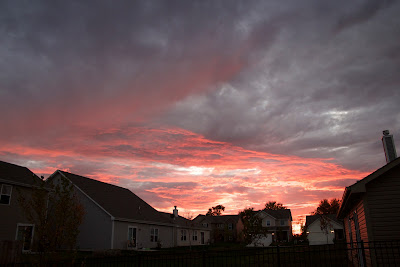
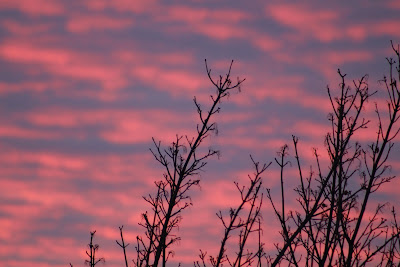
I went back in time through my archives to look for wide angle versions of my favorite sunset photos to show the difference. It's sort of a behind the scenes look at what the sky 'really' looked like. 

blue and red sunset
Canon T5i aperture priority mode (Av), ISO 400, 33mm cropped, f/4.5, 1/200 sec
gray and red sunset
Canon T5i aperture priority mode (Av), ISO 400, 18mm, f/4, 1/50 sec

Now you might be thinking, "come on Eric, you aren't using the same camera settings, that's not fair to attribute the better photo to the focal length and not the exposure." To which I would say I was shooting in aperture priority (Av) mode which means the camera is doing the work calculating the best exposure for what is in frame - so when I have more gray clouds in frame it tries to accommodate those as well. Tightening the shot by zooming in was the easiest and fastest way to get a better sunset photo. 

Let's try another one, here we see an unusual sky color - on it's own not bad. But next we see it being used as an abstract background that fills the entire frame.
meh sunset
Canon T5i, ISO 800, 53mm, f/5.6, 1/800 sec
abstract sunset
Canon T5i, ISO 800, 300mm, f/5.6, 1/250 sec

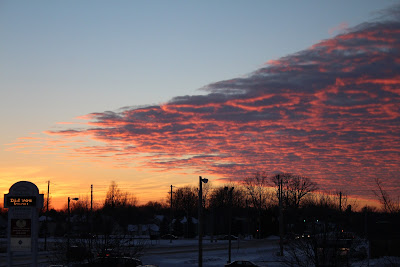
Ok, I saved my best for third - this example really drives home the point because both the wide and tight shot use the same ISO and shutter speed. You can clearly see in the wide angle shot that the sunset is neat but nowhere near as mind blowing as the tighter shot leads you to believe. It looks like the entire sky is blood red, when really it's just a strip near the horizon. Nevertheless, it makes a nice backdrop for the utility pole - can you spot the pole down by the horizon in the wide angle shot?
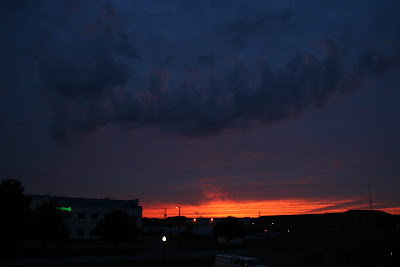
sunset wide angle not impressive
Canon Rebel XT, ISO 400, 18mm, f/4.5, 1/50 sec

red sunset
Canon Rebel XT, ISO 400, 300mm, f/5.6, 1/50 sec

So there you have it - some examples of how shooting sunsets close to the horizon can make a thin strip of color look like a magical magnificent sunset.

Saturday, October 10, 2015

October 9, 2015 Conjunction: Moon, Mars, Venus, Jupiter

Chris texted me to go outside and look at the moon and a bunch of stars. When I got out there I noticed a conjunction between the crescent moon, Venus and Jupiter, and I didn't notice until I looked it up in my StarWalk app that Mars was in the mix as well!

The 3 planets show up well in photos, and the white/blue star Regulus is a nice addition as well. I had some thin clouds obstructing my view, but that made for an interesting glowing orb effect in the longer exposures. Venus looks like a smaller second moon glowing in the morning sky!

october 9 2015 conjunction
Cropped single shot from Canon T5i - f/5.6, 6 sec, ISO 800, 34mm

moon and planets over houses
Single shot Canon T5i, f/5.6, 6 sec, ISO 800, 34mm

moon mars venus jupiter conjunction
Single shot Canon T5i, f/5.6, ISO 400, 55mm, 1.3 sec

Sunday, September 27, 2015

Photos from Super Blood Moon Total Lunar Eclipse September 27, 2015

Here are my quick total lunar eclipse photos before I go to bed, I wanted to at least get something up from my DSLR and not just photos from my iPhone taking pics of the back of the display. Here are a few keepers, and a few that set the scene.

super blood moon lunar eclipse photo
Canon T5i, stack of 10 frames in Registax, each at 300mm, ISO 1600, f/5.6, 1 sec
super blood moon photo
(Left) Image straight from camera (Right) Resulting image after stacking and High Pass layer in Photoshop

total lunar eclipse sequence
Eclipse sequence composite! The haze kinda messes up my layout, but it's still a nice collection in spite of the clouds.

You can see how, especially with a dim subject like the fully eclipsed moon, stacking layers to reduce noise really cleans things up! I havne't done that for all my eclipse phases yet, but I wanted to get some of these posted quickly. Also, the thin layer of clouds might make it a waste to try to mess with stacking when there is already haze covering everything.

The haze did make for some interesting features, compared to the typical straight forward eclipse photos you see online.

september 27 eclipse clouds
Things were off to a rough start, and I was worried I wouldn't get to see any of the eclipse. I even put my telescope back inside and just focused on my DSLR because I knew I wouldn't have a lot of leisure time to mess around. Single shot Canon T5i, ISO 800, 75mm, f/5.6, 4 sec

super moon through clouds
This gives you an idea of just how much haze was in the sky. I could see the disc of the moon, but would I be able to see the shadow of the eclipse at all? Single shot Canon T5i, ISO 100, 300mm, f/5.6, 1/3 sec

penumbral eclipse
Pretty sure this is penumbral eclipse and not just a cloud. The moon was clear of any thick clouds, and was uniformly blocked by haze, so I believe the dimming on the left is the shadow from the Earth's penumbra. Single shot Canon T5i, ISO 100, 300mm, f/5.6, 1/400 sec

lunar eclipse through clouds
Clouds moving fast creating an interesting effect around the partially eclipsed moon. At 2 sec, I should have had more blur of the moon itself, but it turned out kinda neat. Single shot Canon T5i, ISO 100, 300mm, f/5.6, 2 sec

september 27 eclipse photos
Partial eclipse with appropriately exposed lunar surface. Single shot Canon T5i, ISO 100, 300mm, f/5.6, 1/400 sec

september 27 eclipse photos
More cloudy halo around the moon. Single shot Canon T5i, ISO 100, 300mm, f/5.6, 1 sec

september 27 blood moon eclipse
Almost total, the moon was a tiny sliver in a bizarre shape it never makes on its own going through the regular phases. Single shot Canon T5i, ISO 800, 300mm, f/5.6, 1/2 sec

september 27 blood moon eclipse
Total eclipse but still rather bright on the right side. Single shot Canon T5i, ISO 800, 300mm, f/5.6, 1.3 sec