Monday, July 13, 2020

c/2020 F3 NEOWISE at 5:01am from Indiana July 13, 2020

Visible to the naked eye this morning. Comet c/2020 F3 NEOWISE at 5:01 a.m. facing NE in Noblesville, Indiana. Shot with DSLR on tripod.

comet neowise in the morning sky july 13 2020
Canon T5i, ISO 3200, 75mm, f/4, 4s

I set an alarm for 4:30 a.m. but I was up at 4:15 because I was too excited. I made some coffee and doused myself in bug spray, ready to head out to a spot I scouted the evening before with Chris. I used an app called Theodolite to scout my location because it accurately measures through my iPhone the direction and elevation of the crosshairs in my camera viewfinder so I can tell if I have a clear view of the NE sky at 10 degrees above the horizon. 

coffee and head lamp

I didn't even have time to drink my coffee. I figured I'd be waiting around for the comet to rise above the building across the street, but I guess I under estimated how high it would be by 5am. When I got to the sidewalk, I quickly got my bearings spotting Venus and Aldebaran in close conjunction and looked to the left. 

tripod on sidewalk at night

Dawn was quickly approaching, and I just used the spray and pray method, using all different combinations of duration and ISO so that I wouldn't come home with a bunch of streaky blurry or extremely noisy shots. I didn't do anything fancy, these are just single exposures and I turned the yellow tint down ever so slightly because I was surrounded by street lights. 

c2020 f3 comet neowise july 13 2020
Canon T5i, ISO 3200, 55mm, f/5.6, 8s


comet neowise at dawn before sunrise
15 minutes later already much lighter


comet neowise from indiana 300mm
Canon T5i, 300mm, ISO 3200, f/5.6, 2.5s


Saturday, August 4, 2018

Thrift Shop Meade 285 Reader Question

I got this question from a reader and I thought I'd post it here as well in case it is helpful to anyone else:
I recently bought a Meade 285 at a Thrift Shop. It is missing the eyepiece. Could you provide me any specifications (i.e. diameters) or supply sources for replacement parts? I stumbled across your blog with searching. Thanks for any info you can provide.
Here is my response and photos to help with the description:

If you have the angled mirror pieces and everything and you just need the eyepiece itself, you can buy a wide variety that will work. You can buy any of the 1.25" barrel eyepieces, this is the most common type as well.

The physical diameter of the bottom of the chrome collar is 1.50" but the eyepiece barrel itself is 1.25". I've attached photos showing the eyepiece dimensions for the ones that came with my telescope, they are the Meade MH9mm and Meade MA25mm. 

The 9mm gets more magnification but is kinda cheap, and the 25mm is a great medium magnification that shows detail but still wide enough field of view that you can find your targets faster (locating it with wider view and then changing the eyepiece for a closer view). Like I said the 9mm that came with it was basically cheap plastic so I bought a Orion 8920 6mm Expanse Telescope Eyepiece (http://amzn.to/2Ea7QTX) that I really like.

eyepiece barrel diameter
Barrel diameter

eyepiece barrel diameter
Chrome collar outside dimensions

eyepiece with chrome collar detached
Eyepiece with chrome collar

meade 285 eyepieces
Both eyepieces that came with my Meade 285

Tuesday, January 30, 2018

What To Expect: January 31, 2018 Lunar Eclipse from Indiana

The weather is not looking great for the "total super blue blood moon" lunar eclipse tomorrow morning in Indiana, but would it be visible under nicer conditions? TimeandDate.com provides eclipse calculations by location, so just type in your zip code and see what the eclipse will look like at different times. 

We’d hit 50% magnitude when the moon is about 6° above the horizon (similar to this photo from the April 4, 2015 lunar eclipse in Indiana), so you’d have to have a completely unobstructed view to the West to see it reach total redness as it slips under the horizon (washed out by the lighter sky as the sun rises on the opposite horizon). For reference, 3 fingers held at arms length is about 5° of elevation.

April 4, 2015 lunar eclipse in Indiana
Photo from the April 4, 2015 lunar eclipse from Noblesville, IN

3 fingers at arms length against the horizon

Saturday, October 21, 2017

Remove Airplanes and Clean Up Star Trail Photos

I tried to catch the Orionid Meteor Shower last night, and while I saw about 3-4 with my own eyes, I didn't catch any in the camera. That's okay though! Because one of the best consolation prizes from a meteor hunt is the star trail photos you can make from stacking all your pics together. I took 400 individual photos, each 15 seconds long, between 9:45pm and 11:35pm last night. If you live in the Midwest like me, or anywhere near civilization really, you're bound to have an airplane muck up your star trails. While this isn't necessarily bad, sometimes it's interesting to see just how busy the sky is at night, it can distract from the beautiful swirl of the stars as the Earth turns.

before and after photoshop star trails
Star trails before and after with some easy touch-ups
If you don't already know how to do star trails, check out the free software called StarStaX. In short, you can stack of bunch of individual photos to create star trails without doing one big long exposure, which is the traditional route. If you're a star trail purist, your 2 hour long exposure could be ruined by someone bumping the tripod or a car passing by with bright headlights. With star trail stacking, you can throw out or edit a frame here and there and it doesn't ruin the entire batch.

The way stacking works is the software keeps the brightest pixel from each image. It's the same as the Lighten blend option in Photoshop. So anything dark will be replaced with something lighter, and things that are bright stick around. If the stars are the brightest pixels in their pathway, their light is kept. If something is brighter like a plane or clouds, those pixels are kept instead.

We can take advantage of this to edit out the planes and other junk in the photos because making things dark is the same as erasing them, and we don't have to worry about filling the empty space because there are plenty of brighter pixels in the other photos that will take its place.
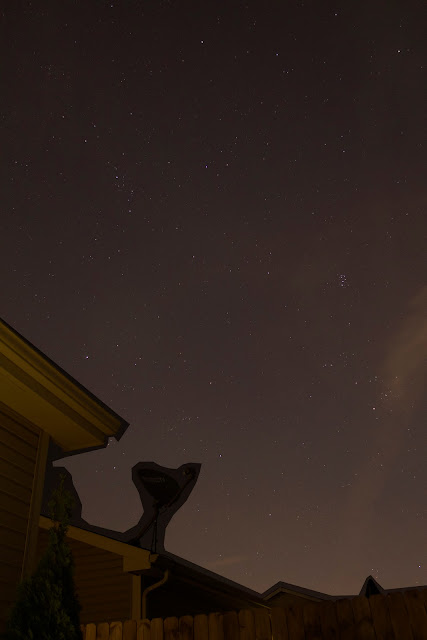
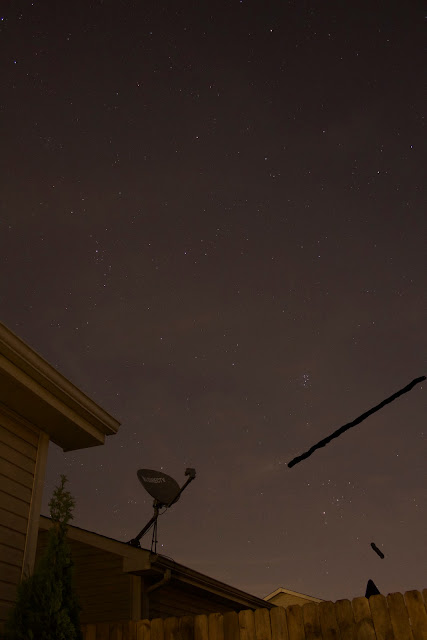
remove bright area from star trails
Here's an example of a frame I edited. I want to keep the stars, but someone turned on the porch light which made the side of the house bright yellow. I did a very rough selection in Photoshop and made this area darker, knowing it would be replaced by the lighter section of the house in the other images. 
remove airplane from star trails
Here's another individual image. I remove 2 light trails from planes in this image by just coloring black over them. Since the ambient sky background in other images is lighter than the black, I know that the lighter pixels will be kept and these black pixels will be thrown out anyway - so it's the same as erasing them. I don't even have to have sharp edges or straight lines, the stacking averages out everything around it and you won't see the erase marks at all. 
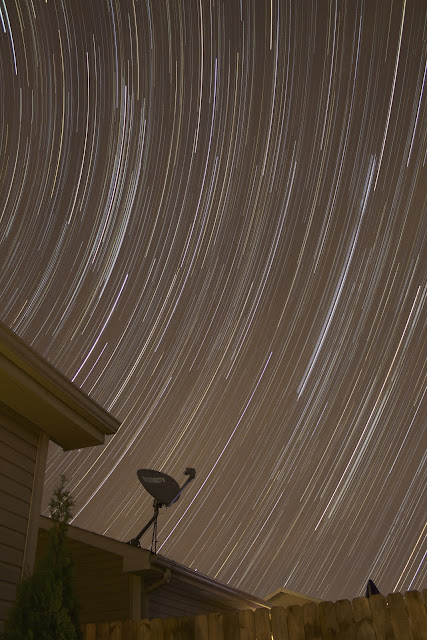
star trails natural light
Here is the final image without planes. 400 images stacked, each 15 sec, ISO 800, f/4.0, 18mm. The image looks too yellow because of the light pollution in the area and in the neighborhood, so there's just a couple tweaks left to make in Photoshop. 
purple star trails in backyard
Here's my final product. Color balance and contrast is like cooking with spices, everyone will have their own taste. I like to go a little blue/purple to get rid of the gross yellow light - but not so purple that it looks like a disco blacklight party. I turned up the contrast a little bit to hide the yellow clouds that kinda smeared across the image, but again not too much because I don't want it to look completely fake. These 2 hour star trails are nice and long, and without the distracting planes, it looks much more peaceful. 

Well this really wasn't meant to be a tutorial, but I just wanted to document my process a little. Another star trail consolation prize to add to my collection, and a little bit of post processing work took it from neat to pretty cool.

Monday, September 4, 2017

Eerie Red Sun Through Clouds with Visible Sunspots

I know you're not supposed to look directly at the sun even through clouds, but it's so tempting when you step outside and see this eerie red sun glowing to the West through a layer of uniform clouds - especially when you've been seeing tweets all day about the huge active region (sun spots) on the face of the sun right now. What an easy opportunity to try to capture some sunspots and this weird red sun in a flat background of gray. I tried looking at it first with a pair of eclipse glasses, and couldn't see anything at all, so then I took a few sideways glances and set up my camera.

sunspots visible through clouds active region 2674 and 2673
Single frame Canon T5i 300mm, ISO 100, f/8, 1/500 sec very minor contrast tweak in iPhoto otherwise straight from the camera. Active regions visible in the middle (sunspots). 

Chris and Zack said they could see the sunspots with the naked eye. Eeeeeeh! I wasn't going to stare at it long enough to try to see them, but I could clearly see them through my eyepiece on the camera.

compare canon 300mm sunspots to nasa soho image of active regions
My photo vs. NASA SOHO to show the labeled active regions. I played with curves and sharpness to try to bring them out a little bit more. Had to remind myself it's through clouds so it's not going to be super sharp, but WOW look at the size of those things!

I tried to get some context photos, and I've found that the DirectTV dish on the roof makes a convenient foreground target, and it's vaguely space-ey so I guess it works haha.

red sun through gray clouds with direct tv dish in foreground
If you look closely you can see the sunspots even in this wider shot. Single frame with Canon T5i at 75mm, ISO 100, f/8, 1/500 sec

And yet another context shot, with my iPhone before I ran inside to get my tripod. I think this weird red sun through clouds beats out my eerie yellow sun from a few years ago. What do you think?

iphone photo sun through gray clouds
iPhone photo wide angle showing the sun in the sky with the solid gray clouds

I guess I had HDR turned on because the roofline has a glow around it, but this wasn't meant to be a cool iPhone photo of the sun just an example of the setting with the weird gray sky and red sun high in the sky. It's like the color of a sunset but much higher away from the horizon. The iPhone photo makes it look a little darker than it really was because I was trying to properly expose the sun.