Showing posts with label light pollution. Show all posts

Saturday, July 26, 2014

First Light in Noblesville, Assessing Light Pollution

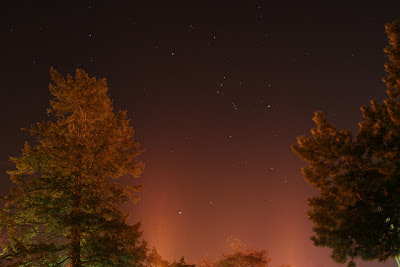
I finally busted out my camera and tripod and took advantage of my very own backyard patio to get a lay of the land for our local light pollution.

It was a little hazy, which was no good for stargazing, but perfect to amplify the light pollution. Below are some photos showing the general direction, current horizon line (will change with construction), light domes, and foreground objects.

I'm lucky that my immediate neighbors on 3 sides so far are 1-story houses - whew! - I would hate to be boxed in on all sides by 2-stories.

noblesville light pollution
From my back patio facing South, f/5.6, 15 sec, ISO 1600, 18mm
noblesville light pollution
Back patio facing ESE, f/5.6, 15 sec, ISO 1600, 18mm

noblesville light pollution
Back patio facing SE, f/5.6, 15 sec, ISO 1600, 18mm

noblesville light pollution
Back patio facing WSW, f/5.6, 15 sec, ISO 1600, 18mm

noblesville light pollution
Front sidewalk facing North, f/5.6, 15 sec, ISO 1600, 18mm

noblesville light pollution
Roofline facing NW, f/5.6, 15 sec, ISO 1600, 18mm

noblesville light pollution
Front roof facing SE, f/5.6, 15 sec, ISO 1600, 18mm

noblesville light pollution
Roofline facing NW, f/5.6, 15 sec, ISO 1600, 18mm

noblesville light pollution
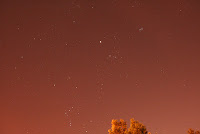
Pleiades and Hyades, front sidewalk facing ESE, f/5.6, 15 sec, ISO 1600, 18mm

Sunday, March 2, 2014

How to Remove Light Pollution from Star Photos with Gaussian Blur Layer

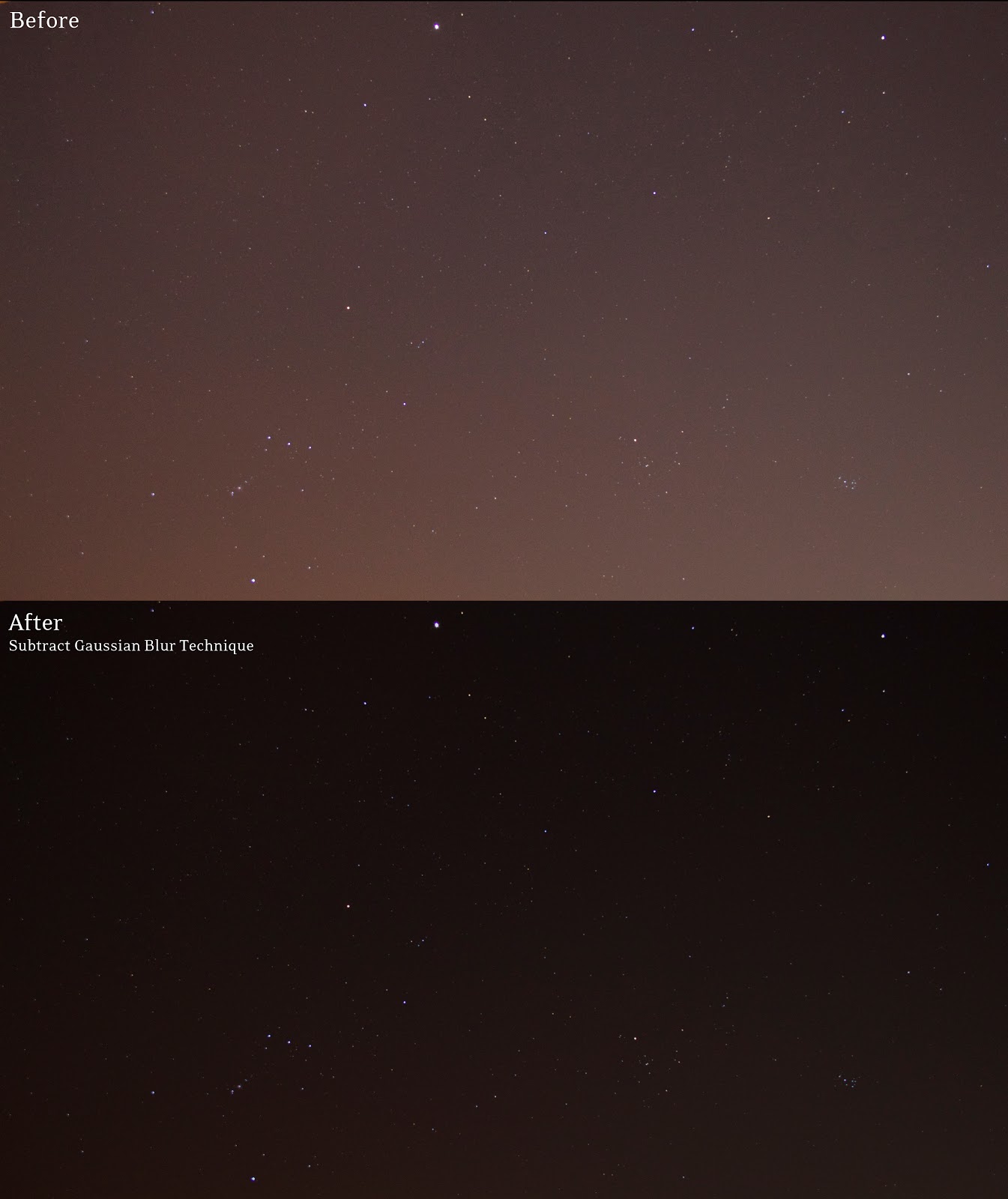
I posted a before and after pic on Instagram that shows a new technique I just learned for removing light pollution by subtracting a Gaussian Blur layer in Photoshop. Based on the comments, it sounds like others - like myself - hadn't tried this technique yet. So I decided to post a sort of screenshot walkthrough for the technique (because everybody hates reading).

Remove Light Pollution from Star Photos
Before and After - original photo is ISO 1600, 18mm, f/4, 10 sec from outside Indianapolis

Remove Light Pollution from Star Photos
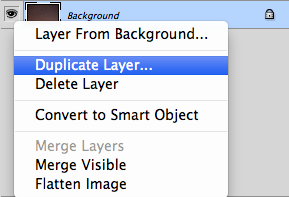
When you open the image it will be the background layer in Photoshop. Duplicate the background layer and name it whatever you want, then make sure this new layer is on top of the background layer.

Remove Light Pollution from Star Photos
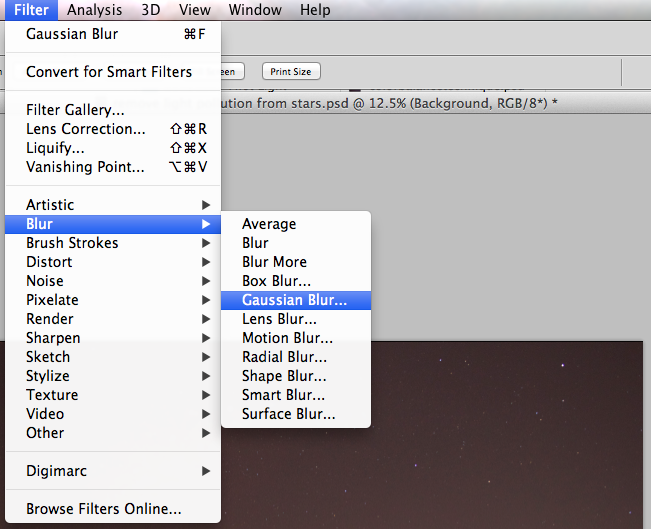
Apply a Gaussian Blur effect to the new top layer...

Remove Light Pollution from Star Photos
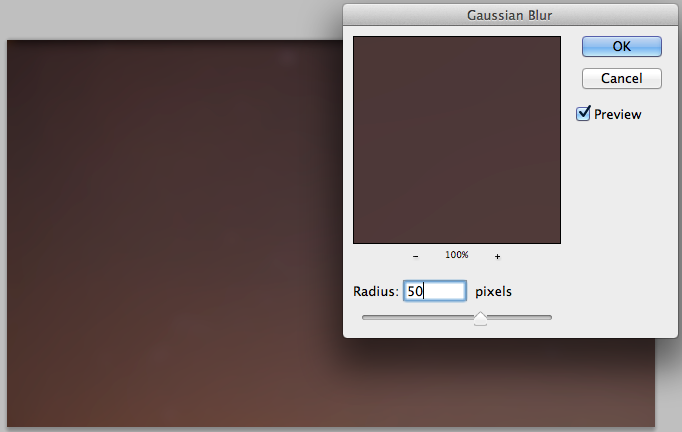
Blur out all the stars, this is typically in the radius 40 to 60 range...

Remove Light Pollution from Star Photos
Choose either Subtract or Difference from the drop down tab, then adjust the Opacity to remove as much of the light pollution color from the photo as you want. 

Your end result will have a lot less light pollution. You may need to increase brightness on the bottom layer. Play around with the settings to your liking, but this should get you pretty close!

This technique is also great for removing vignettes or gradients from photos.

It's simple and fast, and better than my OLD technique of adjusting the colors. Using the color balance approach can help you change the light pollution from an orange yellow mess to something that looks more like the sky, but it doesn't really subtract it or cancel it out. Using white balance has a similar effect, you can adjust the colors but you're not really removing any of the low contrast haze around the stars. Granted, there are some drawbacks - I haven't yet tried this technique with any objects in the foreground.

Sunday, March 3, 2013

What light pollution? View facing North from Bowling Green, Ohio

Facing North at 9:38pm on February 17, 2013 in Bowling Green, Ohio (about 20 miles south of Toledo). This is overlooking the pond on the Forrest Creason Golf Course just south of the Wood County Regional Airport.

The sky is completely washed out up to about 15º above the horizon, and still shows serious signs of sky glow up to about 40º above the horizon.

ISO 1600, f/4.5, 18mm, 15 sec, color adjustment and noise reduction in Photoshop

Saturday, January 26, 2013

A closer look at two kinds of light pollution in my apartment courtyard

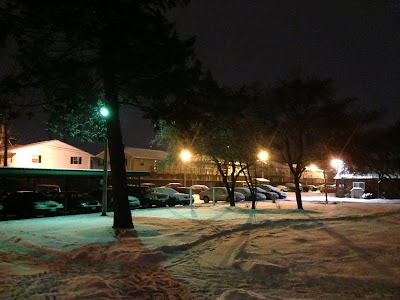
I dream of the days when I will have a dark backyard, possibly surrounded by trees to block the light from neighbors. This view from my typical skywatching location leaves something to be desired, and the lights from the parking lot interfere with my view of the night sky in more than one way.
light pollution
View from my apartment doorstep, taken with iPhone 5 standard camera mode
After noticing a persistent orange glow in a number of my photos, I thought that I might be burning out the image sensor on my slightly older Canon 350D. Then it dawned on me that the glow was probably coming from a combination of parking lot lights and overall skyglow in the area.

When I first saw this I thought my camera was broken. Combination of skyglow and glare.

According to Wikipedia, light pollution comes in a number of forms:
  • Light trespass (light spilling into a neighbor's yard or through a window)
  • Over-illumination (excessive use of light)
  • Glare (reduced contrast due to scattered light)
  • Light clutter (excessive grouping of lights)
  • Skyglow (glow over populated areas caused by light escaping and reflecting upward)

The two forms of light pollution that most affect my night photography are glare and skyglow.

light pollution
Example of Skyglow

light pollution
Example of Glare

light pollution
My apartment complex uses two kinds of lights at night (see difference between blue/white and yellow/amber lights above). The most annoying are horizontally oriented lights that bathe the parking lot in a soft orange glow. From what I can find online, these lights appear to be sodium lights (based on the yellow/amber color). Because "white or blue-rich light contributes significantly more to sky-glow than an equal amount of yellow light," these yellow lights should be less of a contributing factor, if it weren't for their orientation (source).

These yellow lights are oriented at 90° above the nadir (e.g. they're oriented horizontally). The best lights to reduce light pollution are oriented at the nadir (or straight down) and shielded from the sides to keep light aiming straight down.

So while these lights WOULD contribute less to skyglow (if they were properly oriented and shielded) they also interfere in another way, by adding glare.

Because of glare, I'm unable to shoot anything near the horizon. Even when the light itself isn't in my field of view, I still have to contend with glare and its resulting reduction in contrast.

light pollution
Glare
light pollution
Skyglow/Glare

I think the strong rusty red color is more due to glare than skyglow. Skyglow in my area normally shows up as a white/yellow haze up to 40° above the horizon. However, if my lens is directed anywhere toward these horizontal lights, my image quickly floods with an orange glow. It's poison!

Check out this example of light trespass and over (necessary) illumination, the parking lot light is shining right into this poor sap's bedroom window and lighting the side of the building for no reason. That's definitely two in one!

Light Trespass and Over-Illumination
Example of Light Trespass and Over-Illumination

Friday, November 16, 2012

Star trails over Bowling Green on a cold November night

After my excitement over the Orion Nebula and Jupiter in my last post, it's good to get back to some fun star circles - except it was freezing outside tonight! Where Jupiter is a quick pic, I forgot how boring it can be making star trails (especially when it is 28 degrees out).

star trails with canon rebel xt
98 stacked images, 25 sec each, ISO 200

This was my first stacked star trail image on the Canon Rebel XT. Since there was no moon to auto-focus on, I tried focusing on the apartments about 200 yards away. It seemed to work, plus focus isn't as critical with trail pics anyway. Notice how the trails aren't as dotted with the Canon Rebel XT! That's because the camera doesn't have to process for 10 seconds between each photo. Woo!

light pollution and orion
Beautiful light pollution (an oxymoron?)

This was one of my test images before I taped the shutter button down. I think it's pretty cool! It's almost like an inverted Northern Lights. Parking lot light pollution never looked so magical.

star trails over bowling green ohio
Rather messy, stacked right over myself in the foreground

self portrait with orion
Self portrait frame from previous stack

portrait of my camera
Photo of the Rebel XT from the PowerShot

photo looking up below tripod at stars
Looking up below the tripod


Monday, July 23, 2012

Great Lakes at night as seen from space

After discovering the multitude of completely free and awesome images at The Gateway to Astronaut Photography of Earth, I decided to post an interesting shot of the Great Lakes at night as seen from the International Space Station (I added the city labels in Photoshop).

From 250 miles up, you can clearly see Bowling Green, Ohio! Hello astronauts! Down here!

Zoom to 4256 x 2832 pixels